![UrbanSDK_primary_logo_horizontal_white.png]](https://urbansdk-9267502.hs-sites.com/hs-fs/hubfs/UrbanSDK_primary_logo_horizontal_white.png?height=40&name=UrbanSDK_primary_logo_horizontal_white.png)
1.0 Introduction
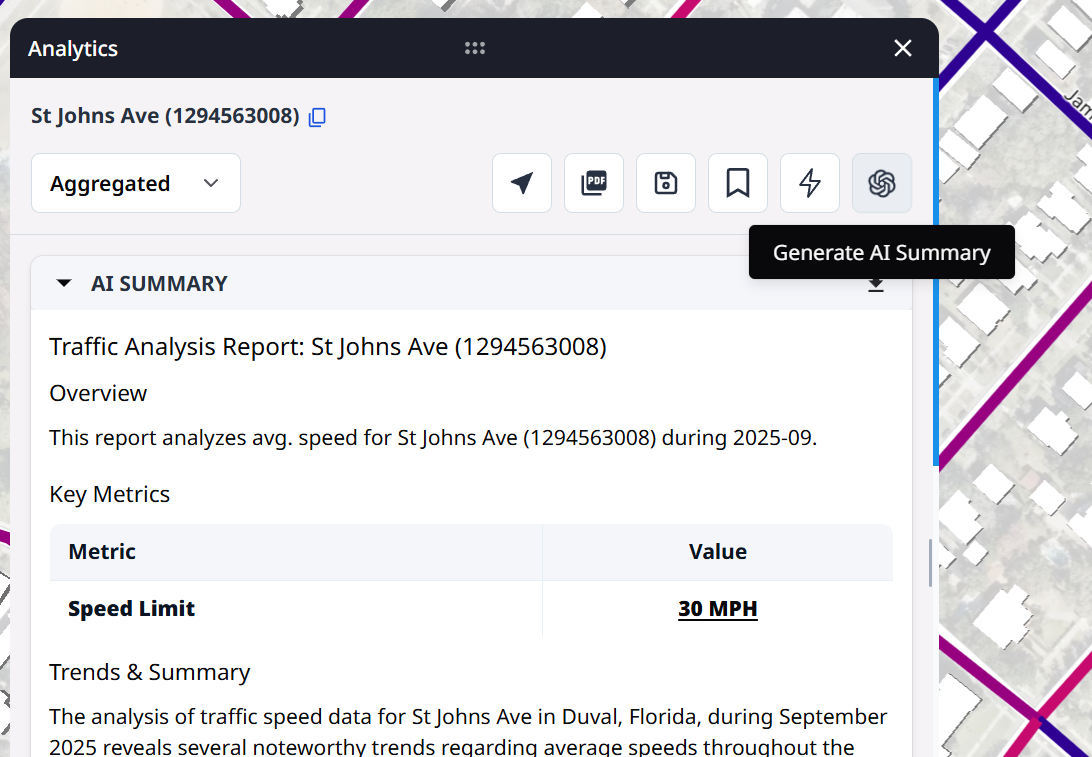
The AI Summary feature provides a quick, automated overview of the analytics currently visible in the panel. It helps you interpret data faster without manually reviewing every metric.
2.0 Generating an AI Summary
Follow these steps to generate an AI Summary within the Analytics Panel:
1. Open the Analytics Panel
- Click any road link to display the Analytics Panel
2. Generate an AI Summary
- Click the AI Summary button (top-right) to generate a summary for the current direction of travel
⚠️NOTE: The AI will only summarize the selected direction of travel. You will have to repeat this process to generate a summary for each direction on a bi-directional road.