![UrbanSDK_primary_logo_horizontal_white.png]](https://urbansdk-9267502.hs-sites.com/hs-fs/hubfs/UrbanSDK_primary_logo_horizontal_white.png?height=40&name=UrbanSDK_primary_logo_horizontal_white.png)
1.0 Introduction
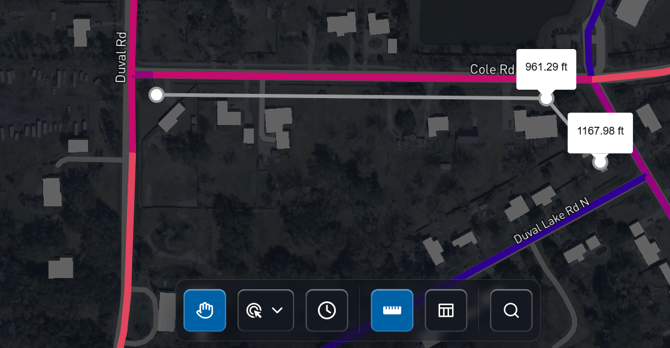
The measuring tool enables you to make quick map measurements.
2.0 Measuring Tool
Following these steps to use the measuring tool:
- Open the tool:
- Click the Measuring Tool button in the Insights Tool Bar
- Place measurement points:
- Click on the map to add points (vertices) along the path or area you want to measure
- Continue clicking to extend the measurement line
- Review measurements:
- Each point displays a tooltip showing the cumulative distance from the starting point
- Distances are reported in feet
- Close measuring tool:
- Click the Measuring Tool button again in the Insights Tool Bar to exit